行の高さ
複数行ラベルには、書体とフォントサイズから推定されるデフォルトの行の高さがありますが、ユーザーが行の高さを手動で定義することもできます。
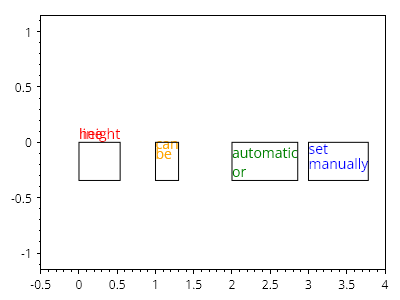
ScottPlot.Plot myPlot = new();

var label1 = myPlot.Add.Text($"行の\n高さ", 0, 0);
label1.LabelLineSpacing = 0;
label1.LabelFontColor = Colors.Red;
label1.LabelBorderColor = Colors.Black;

var label2 = myPlot.Add.Text($"設定\n可能", 1, 0);
label2.LabelLineSpacing = 10;
label2.LabelFontColor = Colors.Orange;
label2.LabelBorderColor = Colors.Black;

var label3 = myPlot.Add.Text($"自動\nまたは", 2, 0);
label3.LabelLineSpacing = null;
label3.LabelFontColor = Colors.Green;
label3.LabelBorderColor = Colors.Black;

var label4 = myPlot.Add.Text($"手動で\n設定", 3, 0);
label4.LabelLineSpacing = 15;
label4.LabelFontColor = Colors.Blue;
label4.LabelBorderColor = Colors.Black;

myPlot.HideGrid();
myPlot.Axes.SetLimitsX(-.5, 4);

myPlot.SavePng("demo.png", 400, 300);
このレシピは、テキストカテゴリにある多数のレシピの1つです