カラーマップのステップ
カラーマップは、プロット可能なオブジェクトに適用できる離散的な色のコレクションを生成するために使用できます。
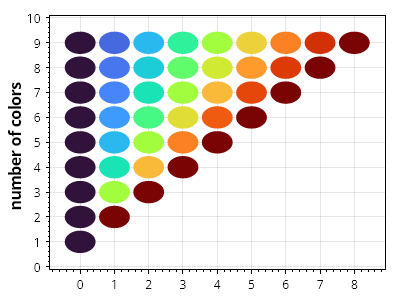
ScottPlot.Plot myPlot = new();

IColormap colormap = new ScottPlot.Colormaps.Turbo();

for (int count = 1; count < 10; count++)
{
    double[] xs = Generate.Consecutive(count);
    double[] ys = Generate.Repeating(count, count);
    Color[] colors = colormap.GetColors(count);

    for (int i = 0; i < count; i++)
    {
        var circle = myPlot.Add.Circle(xs[i], ys[i], 0.45);
        circle.FillColor = colors[i];
        circle.LineWidth = 0;
    }
}

myPlot.YLabel("色の数");

myPlot.SavePng("demo.png", 400, 300);
このレシピは、プロットのスタイリングカテゴリにある多数のレシピの 1 つです