長方形
長方形をプロットに追加し、必要に応じてスタイルを設定できます。
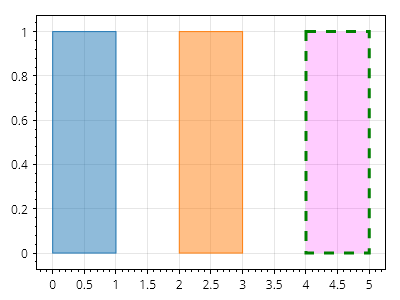
ScottPlot.Plot myPlot = new();

// 点を指定して長方形を追加する
myPlot.Add.Rectangle(0, 1, 0, 1);

// より表現力の高い図形を使用して長方形を追加する
Coordinates location = new(2, 0);
CoordinateSize size = new(1, 1);
CoordinateRect rect = new(location, size);
myPlot.Add.Rectangle(rect);

// プロットに追加した後で長方形のスタイルを設定する
var rp = myPlot.Add.Rectangle(4, 5, 0, 1);
rp.FillStyle.Color = Colors.Magenta.WithAlpha(.2);
rp.LineStyle.Color = Colors.Green;
rp.LineStyle.Width = 3;
rp.LineStyle.Pattern = LinePattern.Dashed;

myPlot.SavePng("demo.png", 400, 300);
このレシピは、図形カテゴリにある多数のレシピのうちの1つです