滑らかな線の張力
一部の平滑化戦略では、滑らかな線の張力を調整できます。低い張力では「オーバーシュート」が発生し、高い張力では曲線がより直線に近く見えます。
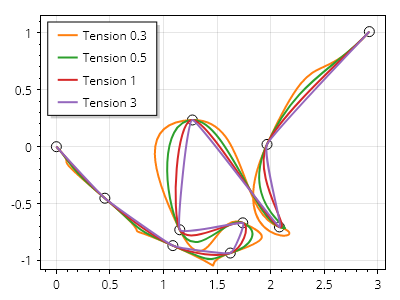
ScottPlot.Plot myPlot = new();

double[] xs = Generate.RandomWalk(10);
double[] ys = Generate.RandomWalk(10);

var mk = myPlot.Add.Markers(xs, ys);
mk.MarkerShape = MarkerShape.OpenCircle;
mk.Color = Colors.Black;

double[] tensions = { 0.3, 0.5, 1.0, 3.0 };

foreach (double tension in tensions)
{
    var sp = myPlot.Add.ScatterLine(xs, ys);
    sp.Smooth = true;
    sp.SmoothTension = tension;
    sp.LegendText = $"Tension {tension}";
    sp.LineWidth = 2;
}

myPlot.ShowLegend(Alignment.UpperLeft);

myPlot.SavePng("demo.png", 400, 300);
このレシピは、散布図カテゴリにある多数のレシピの 1 つです