反転ヒートマップ
ヒートマップは水平方向および/または垂直方向に反転できます
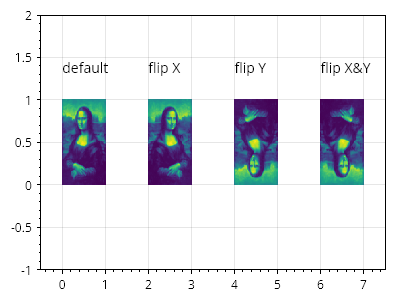
ScottPlot.Plot myPlot = new();

double[,] data = SampleData.MonaLisa();

myPlot.Add.Text("デフォルト", 0, 1.5);
var hm1 = myPlot.Add.Heatmap(data);
hm1.Position = new CoordinateRect(0, 1, 0, 1);

myPlot.Add.Text("X 反転", 2, 1.5);
var hm2 = myPlot.Add.Heatmap(data);
hm2.Position = new CoordinateRect(2, 3, 0, 1);
hm2.FlipHorizontally = true;

myPlot.Add.Text("Y 反転", 4, 1.5);
var hm3 = myPlot.Add.Heatmap(data);
hm3.Position = new CoordinateRect(4, 5, 0, 1);
hm3.FlipVertically = true;

myPlot.Add.Text("X&Y 反転", 6, 1.5);
var hm4 = myPlot.Add.Heatmap(data);
hm4.Position = new CoordinateRect(6, 7, 0, 1);
hm4.FlipHorizontally = true;
hm4.FlipVertically = true;

myPlot.Axes.SetLimits(-.5, 7.5, -1, 2);

myPlot.SavePng("demo.png", 400, 300);
このレシピは、ヒートマップカテゴリに含まれる多数のレシピの 1 つです