ベクトル場クイックスタート
ベクトル(大きさと方向を表す)は、座標空間内の特定の点に配置して、ベクトル場として表示できます。
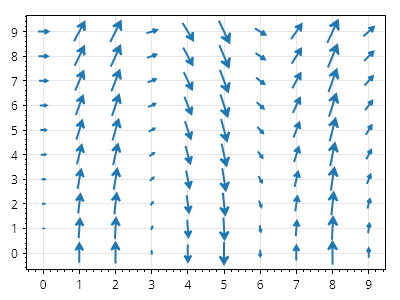
ScottPlot.Plot myPlot = new();

// 位置のグリッドを生成する
double[] xs = Generate.Consecutive(10);
double[] ys = Generate.Consecutive(10);

// ベクトルのコレクションを作成する
List<RootedCoordinateVector> vectors = new();
for (int i = 0; i < xs.Length; i++)
{
    for (int j = 0; j < ys.Length; j++)
    {
        // グリッド上の点
        Coordinates pt = new(xs[i], ys[j]);

        // 方向と大きさ
        float dX = (float)ys[j];
        float dY = -9.81f / 0.5f * (float)Math.Sin(xs[i]);
        System.Numerics.Vector2 v = new(dX, dY);

        // コレクションに追加する
        RootedCoordinateVector vector = new(pt, v);
        vectors.Add(vector);
    }
}

// 根付きベクトルのコレクションをベクトル場としてプロットする
myPlot.Add.VectorField(vectors);

myPlot.SavePng("demo.png", 400, 300);
このレシピは、ベクトル場カテゴリにある多数のレシピの 1 つです