Triangular Axis クイックスタート
三角軸を作成してプロットに追加し、三角グリッド上にデータを表示します。また、三角単位を、任意のプロットタイプを上に配置するために使用できる直交座標に変換するために操作します。
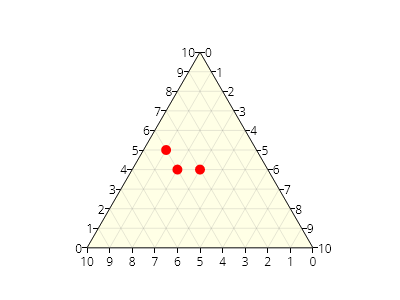
ScottPlot.Plot myPlot = new();

// 三角軸をプロットに追加する
var ta = myPlot.Add.TriangularAxis();

// 三角空間内のさまざまな位置から点を取得する
Coordinates[] points = [
    ta.GetCoordinates(0.50, 0.40),
    ta.GetCoordinates(0.60, 0.40),
    ta.GetCoordinates(0.65, 0.50),
];

// 任意のプロットタイプを三角軸の上に追加できる
myPlot.Add.Markers(points, MarkerShape.FilledCircle, 10, Colors.Red);

myPlot.SavePng("demo.png", 400, 300);
このレシピは、Triangular Axis カテゴリに含まれる多数のレシピの 1 つです