三角軸のエッジのスタイリング
エッジ線、目盛り、目盛りラベル、タイトルテキストのスタイリングオプションは、各軸に対して個別にカスタマイズできます。
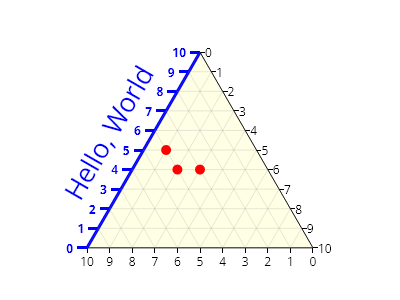
ScottPlot.Plot myPlot = new();

var ta = myPlot.Add.TriangularAxis();

// エッジ線は一方の角からもう一方の角まで伸びます
ta.Left.EdgeLineStyle.Width = 3;
ta.Left.EdgeLineStyle.Color = Colors.Blue;

// 目盛りラベルと目盛りは個別にスタイル設定できます
ta.Left.TickLabelStyle.ForeColor = Colors.Blue;
ta.Left.TickMarkStyle.Color = Colors.Blue;
ta.Left.TickMarkStyle.Width = 3;
ta.Left.TickOffset = new(-10, 0);
ta.Left.TickLabelStyle.Bold = true;
ta.Left.TickLabelStyle.OffsetX = -4;

// 軸タイトルを追加してスタイル設定できます
ta.Left.LabelText = "Hello, World";
ta.Left.LabelStyle.ForeColor = Colors.Blue;
ta.Left.LabelStyle.FontSize = 26;
ta.Left.LabelStyle.Bold = false;
ta.Left.LabelStyle.OffsetX = -20;

// サンプルデータを追加
Coordinates[] points = [
    ta.GetCoordinates(0.50, 0.40),
    ta.GetCoordinates(0.60, 0.40),
    ta.GetCoordinates(0.65, 0.50),
];
myPlot.Add.Markers(points, MarkerShape.FilledCircle, 10, Colors.Red);

myPlot.SavePng("demo.png", 400, 300);
このレシピは、三角軸カテゴリにある多くのレシピの1つです