ツールチップの角度
ツールチップの形状は、ラベルに対する先端の位置に応じて自動的に調整されます。
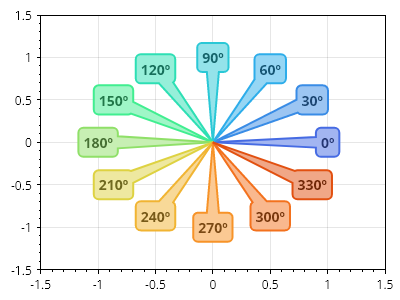
ScottPlot.Plot myPlot = new();

for (int i = 0; i < 360; i += 30)
{
    Coordinates tip = new(0, 0);
    PolarCoordinates polar = new(1, Angle.FromDegrees(i));
    Coordinates label = polar.ToCartesian();
    var tooltip = myPlot.Add.Tooltip(tip, $"{i}º", label);
    tooltip.FillColor = Colormap.Default.GetColor(i, 360).Lighten(0.5);
    tooltip.LineColor = Colormap.Default.GetColor(i, 360);
    tooltip.LineWidth = 2;
    tooltip.LabelBold = true;
    tooltip.LabelFontColor = Colormap.Default.GetColor(i, 360).Darken(0.5);
}

myPlot.Axes.SetLimits(-1.5, 1.5, -1.5, 1.5);

myPlot.SavePng("demo.png", 400, 300);
このレシピは、ツールチップカテゴリに含まれる多数のレシピの 1 つです