線のスタイル
多くのプロットタイプには、カスタマイズ可能な LineStyle があります。
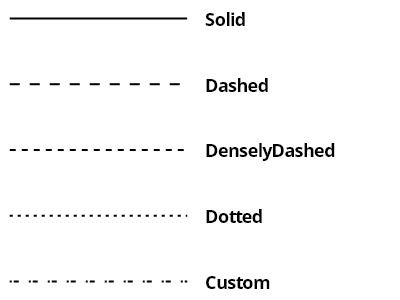
ScottPlot.Plot myPlot = new();

List<LinePattern> patterns = [];
patterns.AddRange(LinePattern.GetAllPatterns());
patterns.Add(new([2, 2, 5, 10], 0, "Custom"));

for (int i = 0; i < patterns.Count; i++)
{
    LinePattern pattern = patterns[i];

    var line = myPlot.Add.Line(0, -i, 1, -i);
    line.LinePattern = pattern;
    line.LineWidth = 2;
    line.Color = Colors.Black;

    var txt = myPlot.Add.Text(patterns[i].Name, 1.1, -i);
    txt.LabelFontSize = 18;
    txt.LabelBold = true;
    txt.LabelFontColor = Colors.Black;
    txt.LabelAlignment = Alignment.MiddleLeft;
}

myPlot.Axes.Margins(right: 1);
myPlot.HideGrid();
myPlot.Layout.Frameless();

myPlot.ShowLegend();

myPlot.SavePng("demo.png", 400, 300);
このレシピは、プロットのスタイリングカテゴリにある多数のレシピの 1 つです