軸のカスタマイズ
軸ラベル、目盛り、フレームはすべてカスタマイズできます。
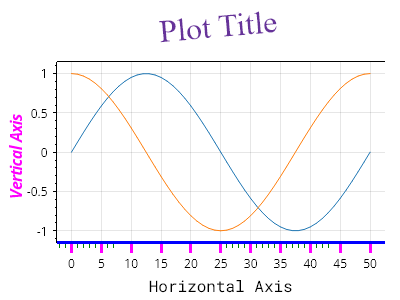
ScottPlot.Plot myPlot = new();

myPlot.Add.Signal(Generate.Sin(51));
myPlot.Add.Signal(Generate.Cos(51));

myPlot.Axes.Title.Label.Text = "プロットのタイトル";
myPlot.Axes.Title.Label.ForeColor = Colors.RebeccaPurple;
myPlot.Axes.Title.Label.FontSize = 32;
myPlot.Axes.Title.Label.FontName = Fonts.Serif;
myPlot.Axes.Title.Label.Rotation = -5;
myPlot.Axes.Title.Label.Bold = false;

myPlot.Axes.Left.Label.Text = "垂直軸";
myPlot.Axes.Left.Label.ForeColor = Colors.Magenta;
myPlot.Axes.Left.Label.Italic = true;

myPlot.Axes.Bottom.Label.Text = "水平軸";
myPlot.Axes.Bottom.Label.Bold = false;
myPlot.Axes.Bottom.Label.FontName = Fonts.Monospace;

myPlot.Axes.Bottom.MajorTickStyle.Length = 10;
myPlot.Axes.Bottom.MajorTickStyle.Width = 3;
myPlot.Axes.Bottom.MajorTickStyle.Color = Colors.Magenta;
myPlot.Axes.Bottom.MinorTickStyle.Length = 5;
myPlot.Axes.Bottom.MinorTickStyle.Width = 0.5f;
myPlot.Axes.Bottom.MinorTickStyle.Color = Colors.Green;
myPlot.Axes.Bottom.FrameLineStyle.Color = Colors.Blue;
myPlot.Axes.Bottom.FrameLineStyle.Width = 3;

myPlot.Axes.Right.FrameLineStyle.Width = 0;

myPlot.SavePng("demo.png", 400, 300);
このレシピは、プロットのスタイリングカテゴリに含まれる多数のレシピのうちの1つです