部分的な SignalXY レンダリング
SignalXY プロットが大きなデータ配列を参照している場合でも、レンダリングを値の範囲に制限できます。設定すると、最小レンダリングインデックスと最大レンダリングインデックスの間にあるデータ範囲のみが表示されます。
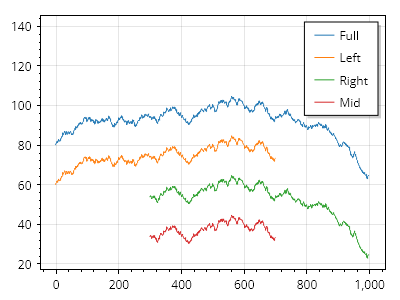
ScottPlot.Plot myPlot = new();

double[] xs = Generate.Consecutive(1000);
double[] ys = Generate.RandomWalk(1000);

var sigAll = myPlot.Add.SignalXY(xs, ys);
sigAll.LegendText = "全体";
sigAll.Data.YOffset = 80;

var sigLeft = myPlot.Add.SignalXY(xs, ys);
sigLeft.LegendText = "左";
sigLeft.Data.YOffset = 60;
sigLeft.Data.MaximumIndex = 700;

var sigRight = myPlot.Add.SignalXY(xs, ys);
sigRight.LegendText = "右";
sigRight.Data.YOffset = 40;
sigRight.Data.MinimumIndex = 300;

var sigMid = myPlot.Add.SignalXY(xs, ys);
sigMid.LegendText = "中央";
sigMid.Data.YOffset = 20;
sigMid.Data.MinimumIndex = 300;
sigMid.Data.MaximumIndex = 700;

myPlot.ShowLegend(Alignment.UpperRight);
myPlot.Axes.Margins(top: .5);

myPlot.SavePng("demo.png", 400, 300);
このレシピは、SignalXY プロットカテゴリにある多くのレシピの 1 つです