ポリゴンプロットのスタイリング
ポリゴンプロットは完全にカスタマイズできます。
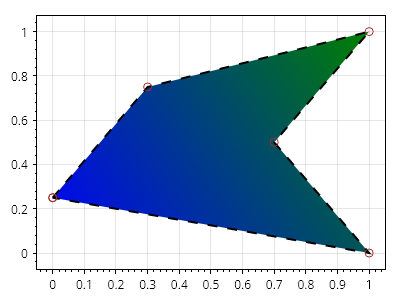
ScottPlot.Plot myPlot = new();

Coordinates[] points =
{
    new (0, 0.25),
    new (0.3, 0.75),
    new (1, 1),
    new (0.7, 0.5),
    new (1, 0)
};

var poly = myPlot.Add.Polygon(points);
poly.FillColor = Colors.Green;
poly.FillHatchColor = Colors.Blue;
poly.FillHatch = new Gradient()
{
    GradientType = GradientType.Linear,
    AlignmentStart = Alignment.UpperRight,
    AlignmentEnd = Alignment.LowerLeft,
};

poly.LineColor = Colors.Black;
poly.LinePattern = LinePattern.Dashed;
poly.LineWidth = 2;

poly.MarkerShape = MarkerShape.OpenCircle;
poly.MarkerSize = 8;
poly.MarkerFillColor = Colors.Gold;
poly.MarkerLineColor = Colors.Brown;

myPlot.SavePng("demo.png", 400, 300);
このレシピは、Shapesカテゴリに含まれる多くのレシピのうちの1つです