ゲージの開始角度
ゲージの開始角度はカスタマイズできます。北は 270(デフォルト値)、東は 0、南は 90、西は 180、などです。
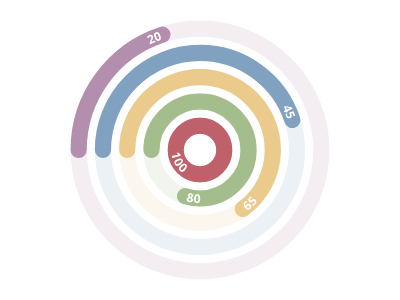
ScottPlot.Plot myPlot = new();

myPlot.Add.Palette = new ScottPlot.Palettes.Nord();
double[] values = { 100, 80, 65, 45, 20 };

var radialGaugePlot = myPlot.Add.RadialGaugePlot(values);
radialGaugePlot.StartingAngle = 180;

myPlot.SavePng("demo.png", 400, 300);
このレシピは、ラジアルゲージカテゴリにある多数のレシピの 1 つです