レーダー系列のカスタマイズ
レーダープロットには RadarSeries オブジェクトのコレクションがあり、それぞれが値のセットと、それをレーダープロット上の形状として表示するために使用されるスタイル情報を記述します。ユーザーはレーダー系列オブジェクトのプロパティを変更することで、各形状を高度にカスタマイズできます。
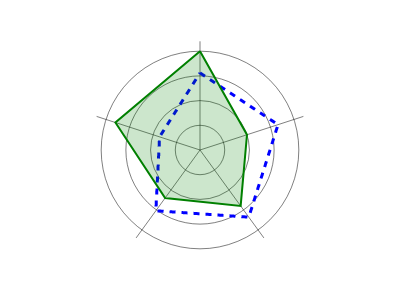
ScottPlot.Plot myPlot = new();

double[,] values = {
    { 78,  83, 84, 76, 43 },
    { 100, 50, 70, 60, 90 }
};

var radar = myPlot.Add.Radar(values);

radar.Series[0].FillColor = Colors.Transparent;
radar.Series[0].LineColor = Colors.Blue;
radar.Series[0].LineWidth = 3;
radar.Series[0].LinePattern = LinePattern.DenselyDashed;

radar.Series[1].FillColor = Colors.Green.WithAlpha(.2);
radar.Series[1].LineColor = Colors.Green;
radar.Series[1].LineWidth = 2;

myPlot.SavePng("demo.png", 400, 300);
このレシピは、レーダープロットカテゴリに含まれる多数のレシピのうちの1つです