極座標軸
極座標軸をプロットに追加し、そのヘルパーメソッドを使用して極座標を直交座標単位に変換することで、他のプロットタイプ(マーカー、線、散布図など)をその上に配置できます。
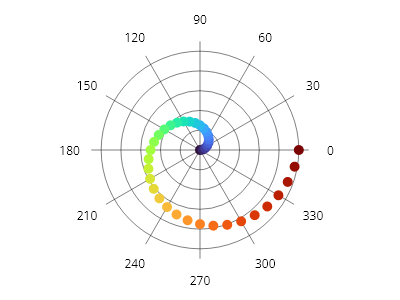
ScottPlot.Plot myPlot = new();

// 極座標軸をプロットに追加する
var polarAxis = myPlot.Add.PolarAxis();

IColormap colormap = new ScottPlot.Colormaps.Turbo();
foreach (double degrees in ScottPlot.Generate.Range(0, 360, 10))
{
    // 極座標空間内の位置からX/Y座標を取得するために極座標軸を使用する
    double radius = degrees / 360.0;
    Coordinates pt = polarAxis.GetCoordinates(radius, degrees);

    // 通常どおりX/Y座標を使用して、マーカーや他のプロットタイプを配置する
    var marker = myPlot.Add.Marker(pt);
    marker.Color = colormap.GetColor(radius);
}

myPlot.SavePng("demo.png", 400, 300);
このレシピは、極座標軸カテゴリに含まれる多数のレシピの1つです