パーセントラベル付き円グラフ
スライスラベルは、各スライスの中央に任意のテキスト(数値を含む)を表示するように調整できます。
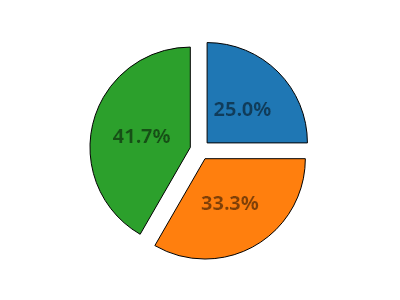
ScottPlot.Plot myPlot = new();

// 円グラフを作成する
double[] values = [6, 8, 10];
var pie = myPlot.Add.Pie(values);
pie.ExplodeFraction = .1;
pie.SliceLabelDistance = 0.5;

// 各スライスのパーセンテージを決定する
double total = pie.Slices.Select(x => x.Value).Sum();
double[] percentages = pie.Slices.Select(x => x.Value / total * 100).ToArray();

// 各スライスラベルをそのパーセンテージに設定する
for (int i = 0; i < pie.Slices.Count; i++)
{
    pie.Slices[i].Label = $"{percentages[i]:0.0}%";
    pie.Slices[i].LabelFontSize = 20;
    pie.Slices[i].LabelBold = true;
    pie.Slices[i].LabelFontColor = Colors.Black.WithAlpha(.5);
}

// 不要なプロットコンポーネントを非表示にする
myPlot.Axes.Frameless();
myPlot.HideGrid();

myPlot.SavePng("demo.png", 400, 300);
このレシピは、円グラフカテゴリにある多数のレシピの 1 つです