カスタムフォントファイル
ユーザーは、フォントファイルから読み込んだカスタム書体を適用できます。
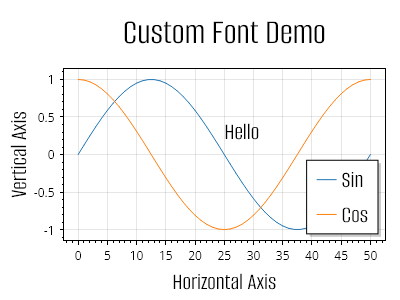
ScottPlot.Plot myPlot = new();

// 指定した名前のフォントでその書体を使用するためにフォントファイルを追加します
Fonts.AddFontFile(
    name: "Alumni Sans",
    path: Path.Combine(Paths.FontFolder, @"AlumniSans/AlumniSans-Regular.ttf"));

// サンプルデータをプロットします
var sig1 = myPlot.Add.Signal(Generate.Sin(51));
sig1.LegendText = "Sin";
var sig2 = myPlot.Add.Signal(Generate.Cos(51));
sig2.LegendText = "Cos";

// カスタムフォントは凡例で使用できます
myPlot.Legend.FontName = "Alumni Sans";
myPlot.Legend.FontSize = 24;

// カスタムフォントは、テキストを含むプロット可能オブジェクトで使用できます
var text = myPlot.Add.Text("こんにちは", 25, 0.5);
text.LabelStyle.FontName = "Alumni Sans";
text.LabelStyle.FontSize = 24;

// カスタムフォントは軸ラベルで使用できます。
// 太字は無効化されていることに注意してください。
// 太字をサポートするには、追加のフォントファイルを読み込む必要があります。
myPlot.Title("カスタムフォントのデモ");
myPlot.Axes.Title.Label.FontName = "Alumni Sans";
myPlot.Axes.Title.Label.FontSize = 36;
myPlot.Axes.Title.Label.Bold = false;

myPlot.XLabel("水平軸");
myPlot.Axes.Bottom.Label.FontName = "Alumni Sans";
myPlot.Axes.Bottom.Label.FontSize = 24;
myPlot.Axes.Bottom.Label.Bold = false;

myPlot.YLabel("垂直軸");
myPlot.Axes.Left.Label.FontName = "Alumni Sans";
myPlot.Axes.Left.Label.FontSize = 24;
myPlot.Axes.Left.Label.Bold = false;

myPlot.SavePng("demo.png", 400, 300);
このレシピは、その他カテゴリに含まれる多数のレシピのうちの1つです