不規則な等高線プロット
等高線プロットは、X/Y 平面上に任意に配置された 3D データポイントのコレクションから作成できます。
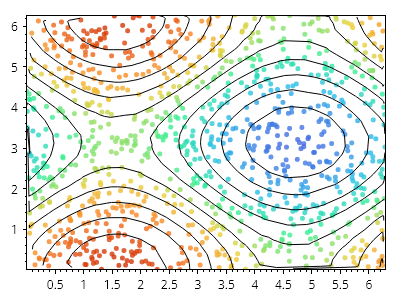
ScottPlot.Plot myPlot = new();

// 不規則な間隔の X/Y/Z データポイントを生成する
Coordinates3d[] cs = new Coordinates3d[1000];
for (int i = 0; i < cs.Length; i++)
{
    double x = Generate.RandomNumber(0, Math.PI *2);
    double y = Generate.RandomNumber(0, Math.PI* 2);
    double z = Math.Sin(x) + Math.Cos(y);
    cs[i] = new(x, y, z);
}

// 各データポイントにマーカーを配置する
double minZ = cs.Select(x => x.Z).Min();
double maxZ = cs.Select(x => x.Z).Max();
double spanZ = maxZ - minZ;
IColormap cmap = new ScottPlot.Colormaps.MellowRainbow();
for (int i = 0; i < cs.Length; i++)
{
    double fraction = (cs[i].Z - minZ) / (spanZ);
    var marker = myPlot.Add.Marker(cs[i].X, cs[i].Y);
    marker.Color = cmap.GetColor(fraction).WithAlpha(.8);
    marker.Size = 5;
}

// 等高線を表示する
var contour = myPlot.Add.ContourLines(cs);

// プロットのスタイルを設定する
myPlot.Axes.TightMargins();
myPlot.HideGrid();

myPlot.SavePng("demo.png", 400, 300);
このレシピは、等高線プロットカテゴリにある多数のレシピの 1 つです