サブタイトル付きの軸
ユーザーは、デフォルトの軸を置き換えるために、完全にカスタムされた独自の軸を作成できます(デモアプリで示されているとおり)。代替の軸表示スタイルに関心のあるユーザー向けに、いくつかの実験的な軸が利用可能です。
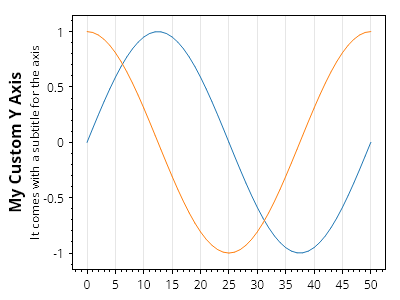
ScottPlot.Plot myPlot = new();

// サンプルデータをプロットする
myPlot.Add.Signal(Generate.Sin());
myPlot.Add.Signal(Generate.Cos());

// カスタム軸をインスタンス化し、必要に応じてカスタマイズする
ScottPlot.AxisPanels.Experimental.LeftAxisWithSubtitle customAxisY = new()
{
    LabelText = "My Custom Y Axis",
    SubLabelText = "It comes with a subtitle for the axis"
};

// デフォルトのY軸を削除し、カスタム軸をプロットに追加する
myPlot.Axes.Remove(myPlot.Axes.Left);
myPlot.Axes.AddLeftAxis(customAxisY);

myPlot.SavePng("demo.png", 400, 300);
このレシピは、軸と目盛カテゴリに含まれる多数のレシピの1つです