矢印のクイックスタート
矢印は、座標空間内の位置を指すためにプロットに配置でき、幅広くカスタマイズできます。
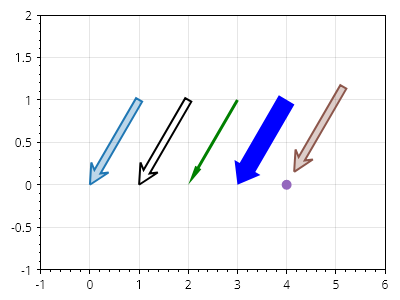
ScottPlot.Plot myPlot = new();

// create a line
Coordinates arrowTip = new(0, 0);
Coordinates arrowBase = new(1, 1);
CoordinateLine arrowLine = new(arrowBase, arrowTip);

// add a simple arrow
myPlot.Add.Arrow(arrowLine);

// arrow line and fill styles can be customized
var arrow2 = myPlot.Add.Arrow(arrowLine.WithDelta(1, 0));
arrow2.ArrowLineColor = Colors.Red;
arrow2.ArrowMinimumLength = 100;
arrow2.ArrowLineColor = Colors.Black;
arrow2.ArrowFillColor = Colors.Transparent;

// the shape of the arrowhead can be adjusted
var skinny = myPlot.Add.Arrow(arrowLine.WithDelta(2, 0));
skinny.ArrowFillColor = Colors.Green;
skinny.ArrowLineWidth = 0;
skinny.ArrowWidth = 3;
skinny.ArrowheadLength = 20;
skinny.ArrowheadAxisLength = 20;
skinny.ArrowheadWidth = 7;

var fat = myPlot.Add.Arrow(arrowLine.WithDelta(3, 0));
fat.ArrowFillColor = Colors.Blue;
fat.ArrowLineWidth = 0;
fat.ArrowWidth = 18;
fat.ArrowheadLength = 20;
fat.ArrowheadAxisLength = 20;
fat.ArrowheadWidth = 30;

// offset backs the arrow away from the tip coordinate
myPlot.Add.Marker(arrowLine.WithDelta(4, 0).End);
var arrow4 = myPlot.Add.Arrow(arrowLine.WithDelta(4, 0));
arrow4.ArrowOffset = 15;

myPlot.Axes.SetLimits(-1, 6, -1, 2);

myPlot.SavePng("demo.png", 400, 300);
このレシピは、矢印カテゴリにある多数のレシピの 1 つです